


How to Migrate to HIPAA Compliant Hosting: An 8-Step Plan With No Coverage Gap (2026)
HIPAA Compliant Hosting · https://hipaacomplianthosting.com/blog/migrate-to-hipaa-compliant-hosting
Last updated: October 10, 2026
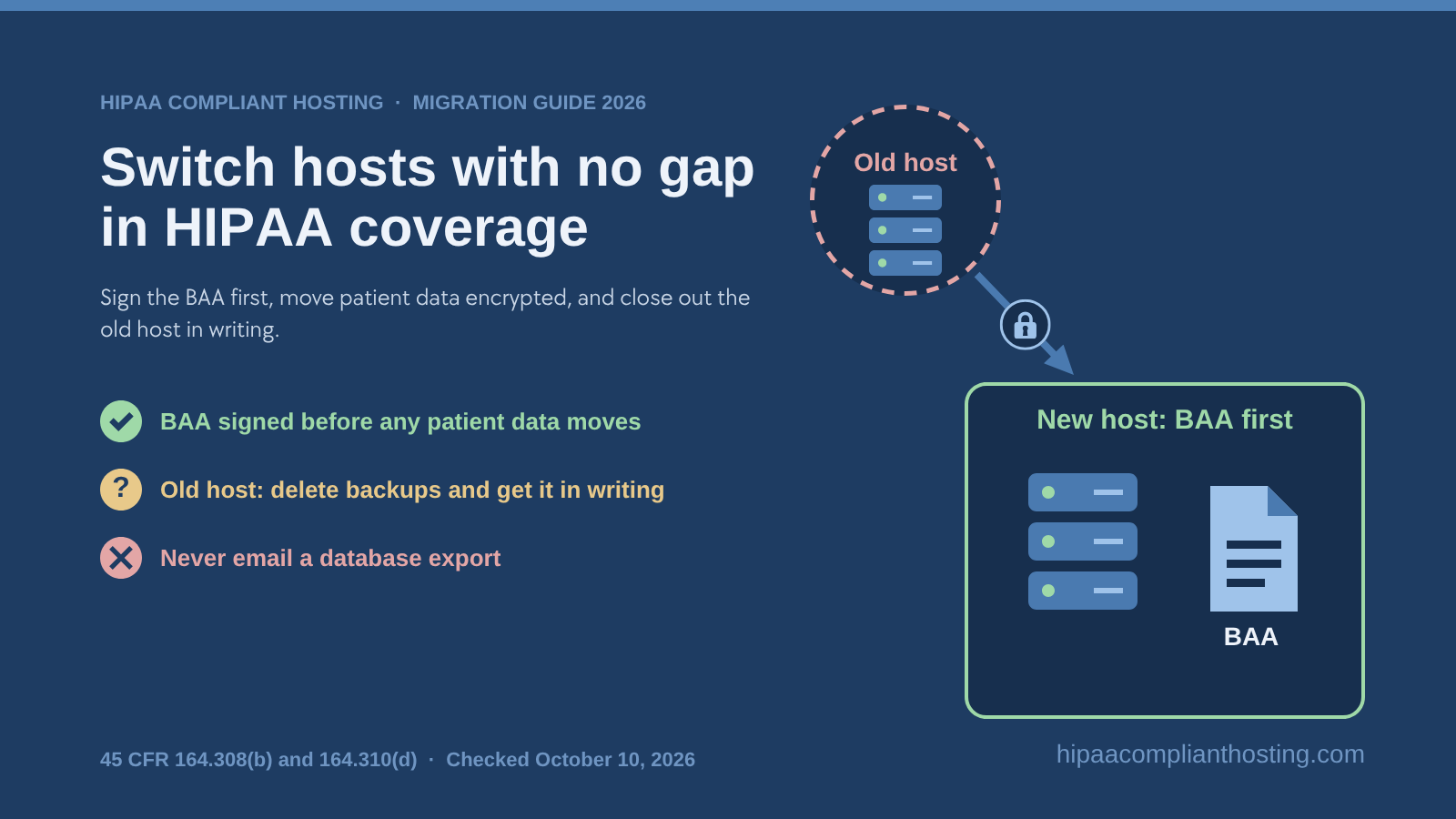
The safe way to switch hosts: sign the Business Associate Agreement (BAA) first, move patient data encrypted, and close out the old host in writing. When you migrate to HIPAA compliant hosting, the order of those steps is what keeps you covered. Most practices delay the move because they fear downtime or a gap in coverage. Both are avoidable with the right order of steps. This guide gives you that order, what usually breaks, and what migration help costs. We run these moves for a living. Every plan we sell includes 4 hours of migration and configuration, so we also show you how our plans handle the move. Weigh our view with that in mind.
TL;DR: Quick answer
Sign the BAA first. A covered entity may let a host store patient data only after it has a BAA in place (45 CFR § 164.308(b)).
Move patient data only over encrypted channels such as SFTP or SSH. Never send exports or database dumps by email.
Most broken migrations fail on forms, email delivery and hard-coded addresses, not on the files themselves.
Close out the old host: delete the data and its backups, and get written confirmation. HIPAA requires a disposal procedure (§ 164.310(d)(2)(i)).
Update your risk analysis afterward. A new host is an environmental change that calls for a fresh evaluation (§ 164.308(a)(8)).
We sign the BAA within 24 hours of signup. Every plan includes 4 hours of migration and configuration, from $229 a month on single-tenant AWS.
Signs it is time to migrate to HIPAA compliant hosting
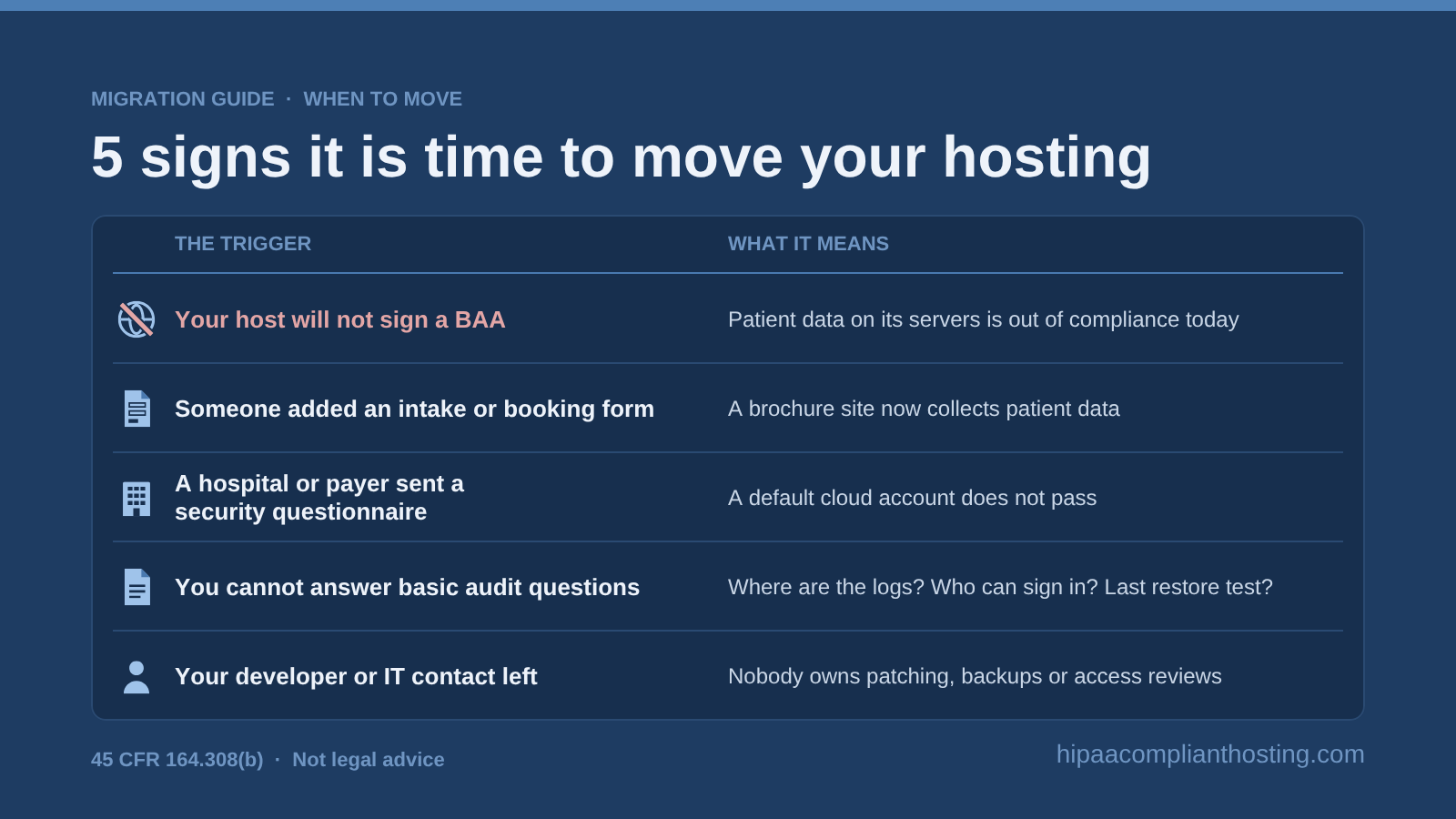
Teams rarely plan to migrate to HIPAA compliant hosting. Something forces it. These are the triggers we hear most often, and each one is a reason to migrate to HIPAA compliant hosting now rather than at renewal.
Your host will not sign a BAA. GoDaddy, Bluehost, Wix and most shared hosts refuse for standard plans. If patient data touches their servers, you are out of compliance today.
Someone added an intake or booking form. A brochure site became a system that collects patient data, but the hosting never changed.
A hospital or payer sent a security questionnaire. Health-tech teams hit this mid-sale. "We run on a default cloud account" does not pass.
You cannot answer basic audit questions. Where are the logs? Who can sign in? When was the last restore test? If nobody knows, the hosting is not doing its job.
Your developer or IT contact left. Nobody now owns patching, backups or access reviews.
Any one of these means the current setup carries risk you can see. The good news: when you migrate to HIPAA compliant hosting, the fix is a defined project, usually measured in days, not months. If you are unsure whether you need HIPAA hosting at all, start with who needs HIPAA compliant hosting. A site that collects no patient data can stay where it is. When price is the sticking point, read whether HIPAA hosting is worth the extra cost.
The 8-step plan to migrate to HIPAA compliant hosting
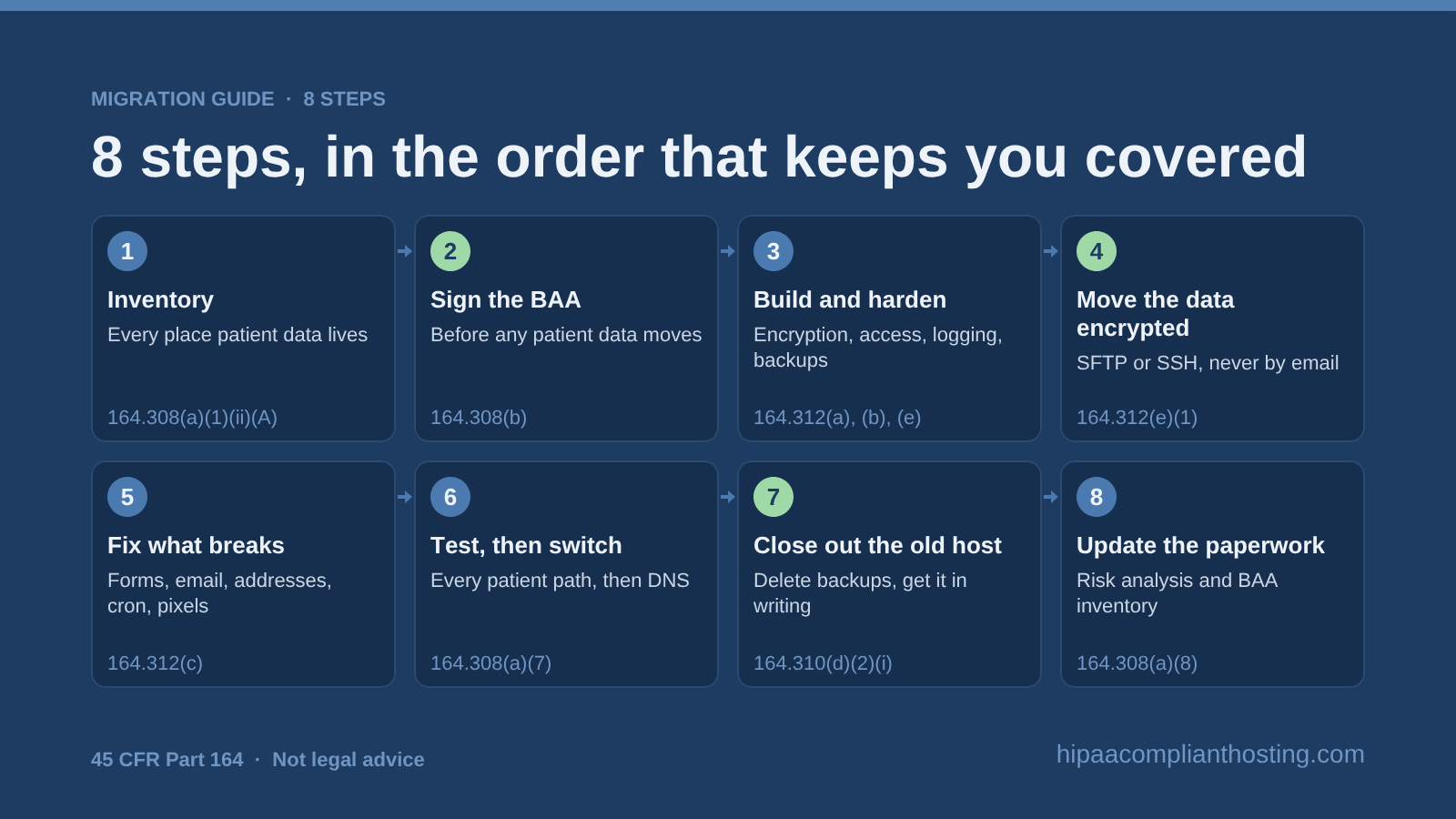
The order matters more than the tools. Contracts come before data, testing comes before the switch, and cleanup comes before you call it done. Here is the sequence we follow whenever we help a team migrate to HIPAA compliant hosting.
Step |
What happens |
HIPAA rule it serves |
|---|---|---|
1. Inventory |
List every place patient data lives: pages, forms, uploads, database tables, email, backups and logs |
§ 164.308(a)(1)(ii)(A) risk analysis |
2. Sign the BAA |
Contract with the new host before any patient data moves |
§ 164.308(b), § 164.502(e) |
3. Build and harden |
Encryption, access control, logging and backups set up on the new server |
§ 164.312(a), (b), (e) |
4. Move the data encrypted |
Files and database copied over SFTP or SSH, never by email |
§ 164.312(e)(1) |
5. Fix what breaks |
Forms, email delivery, hard-coded addresses, scheduled jobs, tracking scripts |
§ 164.312(c) integrity |
6. Test, then switch |
Check every patient path on the new server, then change DNS |
§ 164.308(a)(7) contingency plan |
7. Close out the old host |
Delete data and backups, and get written confirmation |
§ 164.310(d)(2)(i) disposal |
8. Update the paperwork |
Risk analysis, BAA inventory, system list and policies |
§ 164.308(a)(8), § 164.316 |
Step 1: inventory every place patient data lives
Before you migrate to HIPAA compliant hosting, write down what is moving. Most teams list the website and the database, then forget the rest. Check form plugin entries, file uploads, email notifications, old backups, staging copies and server logs. Logs often hold IP addresses and form fields, which can count as patient data.
This list becomes the scope of your BAA and the start of your updated HIPAA risk analysis. It also tells the new host how big the job is. How we handle it: send us your site address and what it collects. We scope the move before work starts.
Step 2: sign the BAA before any data moves
This is the step that keeps the move legal. Section 164.308(b) lets a covered entity allow a host to store patient data only after it gets "satisfactory assurances" in a BAA. If the data arrives first and the BAA a week later, that week is a violation.
Before you migrate to HIPAA compliant hosting, read the new host's BAA for scope. It should cover the servers and services the host runs for you, and say what happens to your data when the contract ends. Our guide to the HIPAA business associate agreement lists the clauses to check. How we handle it: we sign the BAA within 24 hours of signup, always before any patient data moves to us.
Step 3: build and harden the new server
The new environment should be ready before the first file arrives. That means encryption at rest, TLS for everything in transit, multi-factor sign-in for admins, audit logging and a tested backup. Building this yourself takes a cloud engineer and several days. The full control list is in our HIPAA compliance checklist.
How we handle it: every plan runs on a single-tenant AWS server that arrives hardened. That includes encryption at rest and in transit, a web application firewall, six-year audit logging and tested encrypted backups. You do not configure any of it.
Step 4: move the data over encrypted channels
Section 164.312(e)(1) requires measures that guard patient data while it travels over a network. In practice, copy files over SFTP or SSH and move databases through an encrypted connection. Never email a database export, and never park one in a shared drive "for a day."
Plan for the data that changes during the move. A busy intake form can collect new entries while you copy. Freeze changes for a short window, or run a final sync just before the switch. How we handle it: we move the site and database ourselves, over encrypted channels, as part of the 4 included hours.
Step 5: fix what usually breaks
Files and databases rarely cause the trouble. The connections around them do. These are the five things that break most often when teams migrate to HIPAA compliant hosting:
Form notifications. Many form plugins email the full submission. On the new host, send a notice only, and keep the data in encrypted storage. Our guide to HIPAA compliant forms shows the setup.
Email delivery. If the site sends mail through an outside relay, that relay needs its own BAA. Our host BAA does not cover a mail provider we do not run.
Hard-coded addresses. Old IP addresses, URLs and file paths in code or settings point back to the old host.
Scheduled jobs. Cron tasks for backups, reminders or imports must be recreated and tested.
Tracking scripts. A move is the right moment to remove pixels from pages that handle patient data. See HIPAA tracking technologies before you copy them over.
Step 6: test every patient path, then switch DNS
Test on the new server before the public sees it. Rushed attempts to migrate to HIPAA compliant hosting often skip this step. Submit every form, book a test appointment, sign in to any portal and check that the backup ran. Lower your DNS TTL a day or two ahead, so the switch spreads quickly.
Then change DNS and watch the first submissions arrive on the new server. Keep the old site read-only for a few days in case something was missed. How we handle it: we configure the new server, check it with you and agree on a time for the switch.
Step 7: close out the old host in writing
Teams that migrate to HIPAA compliant hosting often skip this step. It leaves a copy of your patient data somewhere you no longer control. Delete the site, its database and its backups at the old host. Section 164.310(d)(2)(i) requires a procedure for the "final disposition" of electronic patient data.
If the old host signed a BAA, the contract should require it to return or destroy the data at termination (§ 164.504(e)(2)(ii)(J)). Ask for written confirmation that backups and snapshots are gone too. If the old host never signed a BAA, read the next section before you close the account.
Step 8: update the paperwork
A new host is exactly the kind of change § 164.308(a)(8) has in mind. It requires an evaluation after "environmental or operational changes" affecting patient data security. Update your risk analysis, your list of vendors with BAAs and your system inventory. Keep these records for six years under § 164.316. When you migrate to HIPAA compliant hosting, this file is what an OCR investigator will ask to see.
What if patient data already sat on a host with no BAA?
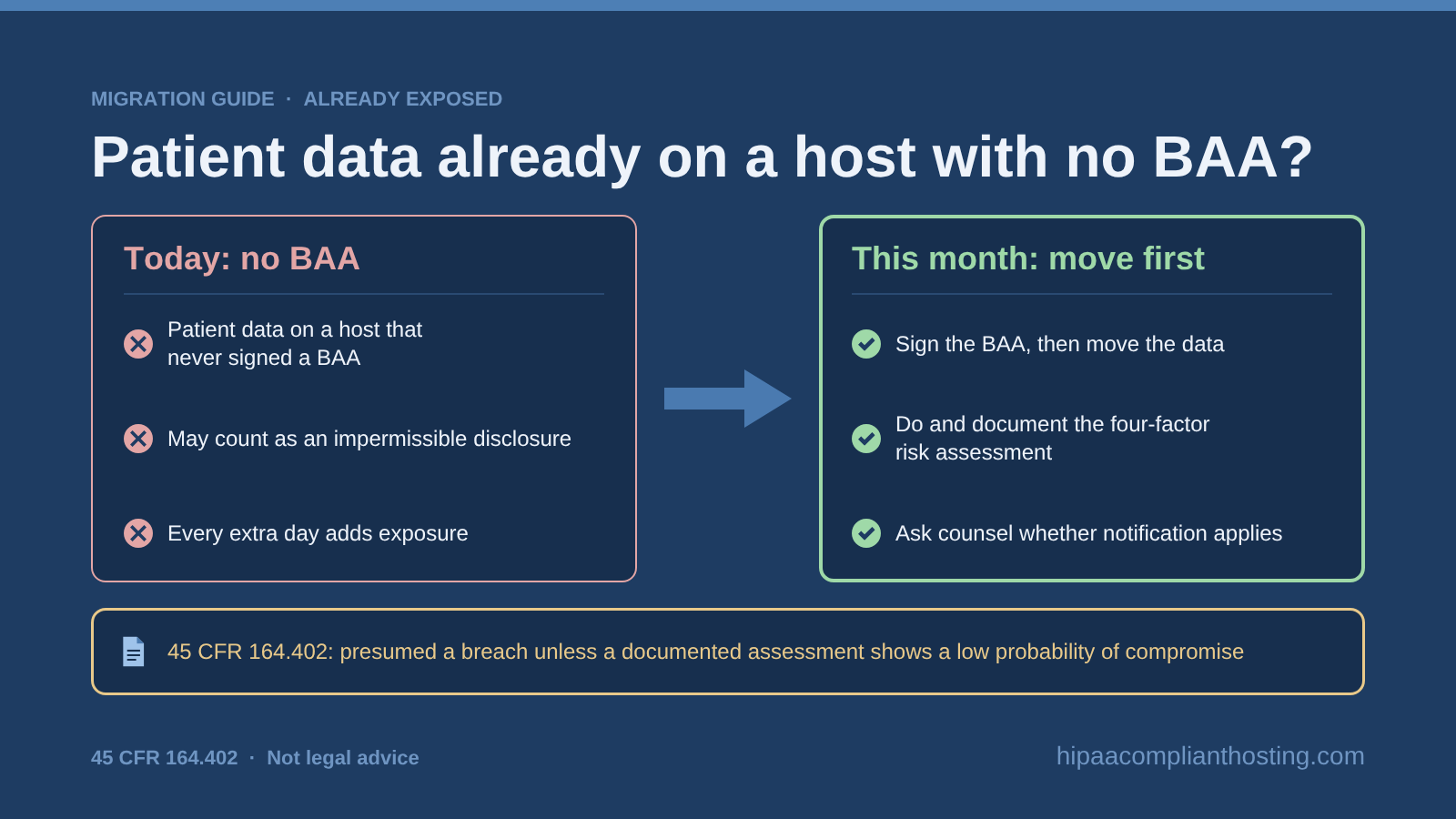
This is common, and it is not a reason to delay. Every extra day adds exposure. Move first, then deal with the history.
Under § 164.402, an impermissible disclosure of patient data is presumed to be a breach. The exception is a documented risk assessment showing a low probability of compromise. Storing data with a host that never signed a BAA may count as one. Do the four-factor assessment, document it, and talk to counsel about whether notification applies. Our guide to an accidental HIPAA violation walks through the first 24 hours.
Fixing the hosting does not erase the past exposure. It does stop it from growing, and it shows good faith if OCR ever asks. That is a strong reason to migrate to HIPAA compliant hosting this month rather than next quarter.
DIY, a freelancer or the new host: who should run the move?
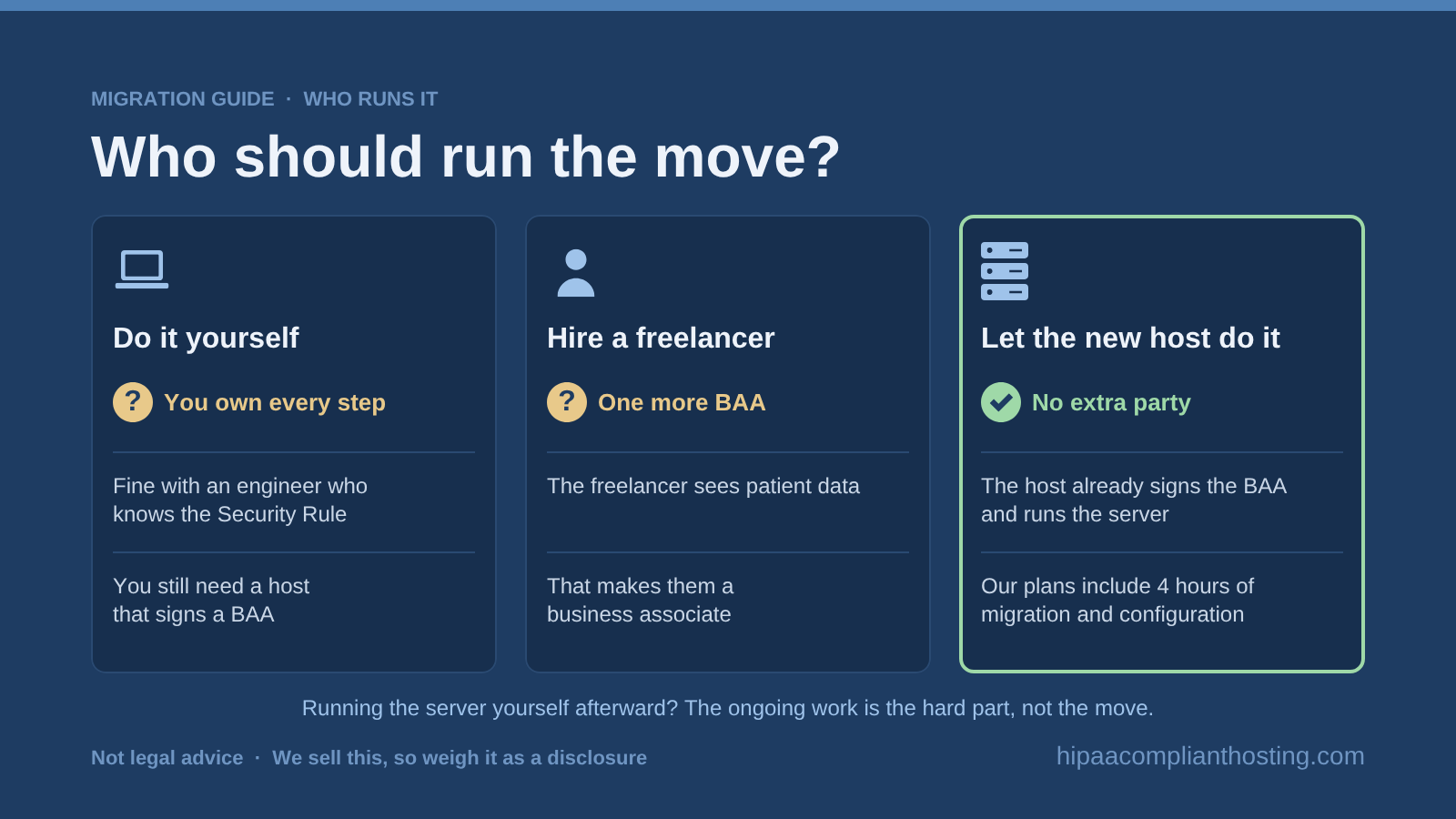
You have three ways to migrate to HIPAA compliant hosting. The right one depends on who will run the server after the move.
Do it yourself. Fine if you have an engineer who knows the platform and the Security Rule. You still need a host that signs a BAA, and your engineer owns every step above.
Hire a freelancer. Workable, but the freelancer will see patient data. That makes them a business associate who needs a BAA of their own.
Let the new host do it. The host already signs the BAA and runs the server, so no extra party touches the data. This is the simplest chain, and it is why we include migration in every plan.
If you plan to run the server yourself afterward, read managed vs self-managed HIPAA hosting first. Most small teams find the ongoing work is the hard part, not the move.
What migration help costs at the specialist hosts
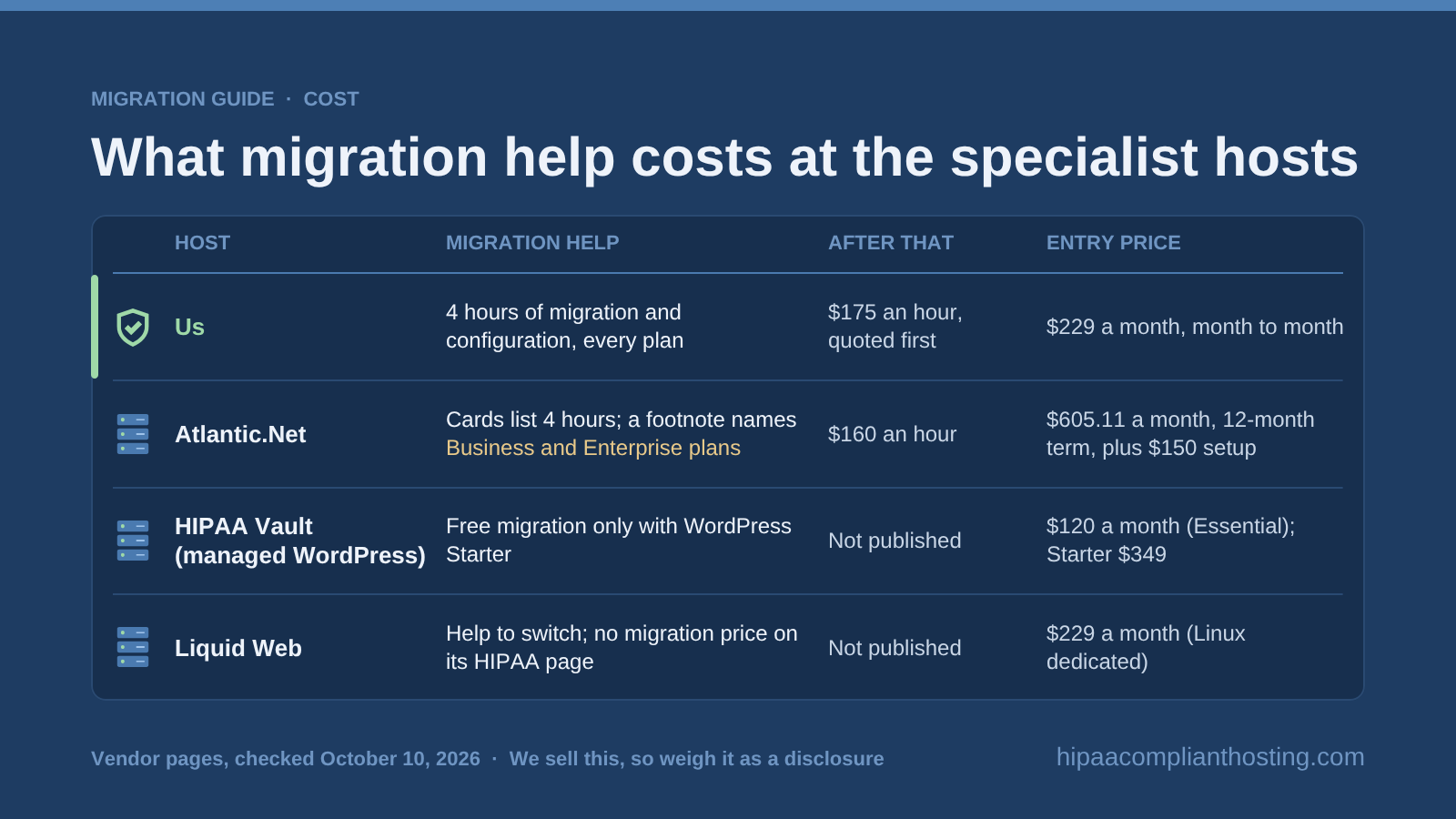
When you migrate to HIPAA compliant hosting, migration terms differ more than plan prices do. If you are switching from Atlantic.Net, we compare four alternatives and explain the switch in a separate article. If you have not picked a destination yet, start with HIPAA compliant hosting providers compared. These are the published terms as of October 10, 2026, checked on each vendor's own page.
Host |
Migration help |
After that |
Entry price |
|---|---|---|---|
HIPAA Compliant Hosting (us) |
4 hours of migration and configuration on every plan, used in the first month |
$175 an hour, quoted before work starts |
$229 a month, month to month |
Atlantic.Net |
Plan cards list 4 hours; a footnote names its Business and Enterprise plans for the free hours |
$160 an hour |
$605.11 a month on a 12-month term, plus a $150 firewall setup fee |
HIPAA Vault (managed WordPress) |
Free migration only with its WordPress Starter plan; other plans pay extra |
Not published |
$120 a month (Essential); Starter $349 |
Liquid Web |
Offers to help you switch "with minimal downtime"; no migration price on its HIPAA page |
Not published |
$229 a month (Linux dedicated) |
Two honest notes. Our hourly rate after the included hours is higher than Atlantic.Net's. And HIPAA Vault's $120 Essential plan costs less than ours, though its free migration starts at the $349 Starter plan. For the full price picture, see our HIPAA hosting cost guide and the comparison of HIPAA Vault alternatives. Our rates and what each plan covers are on our scope of support page.
How we run your move, start to finish
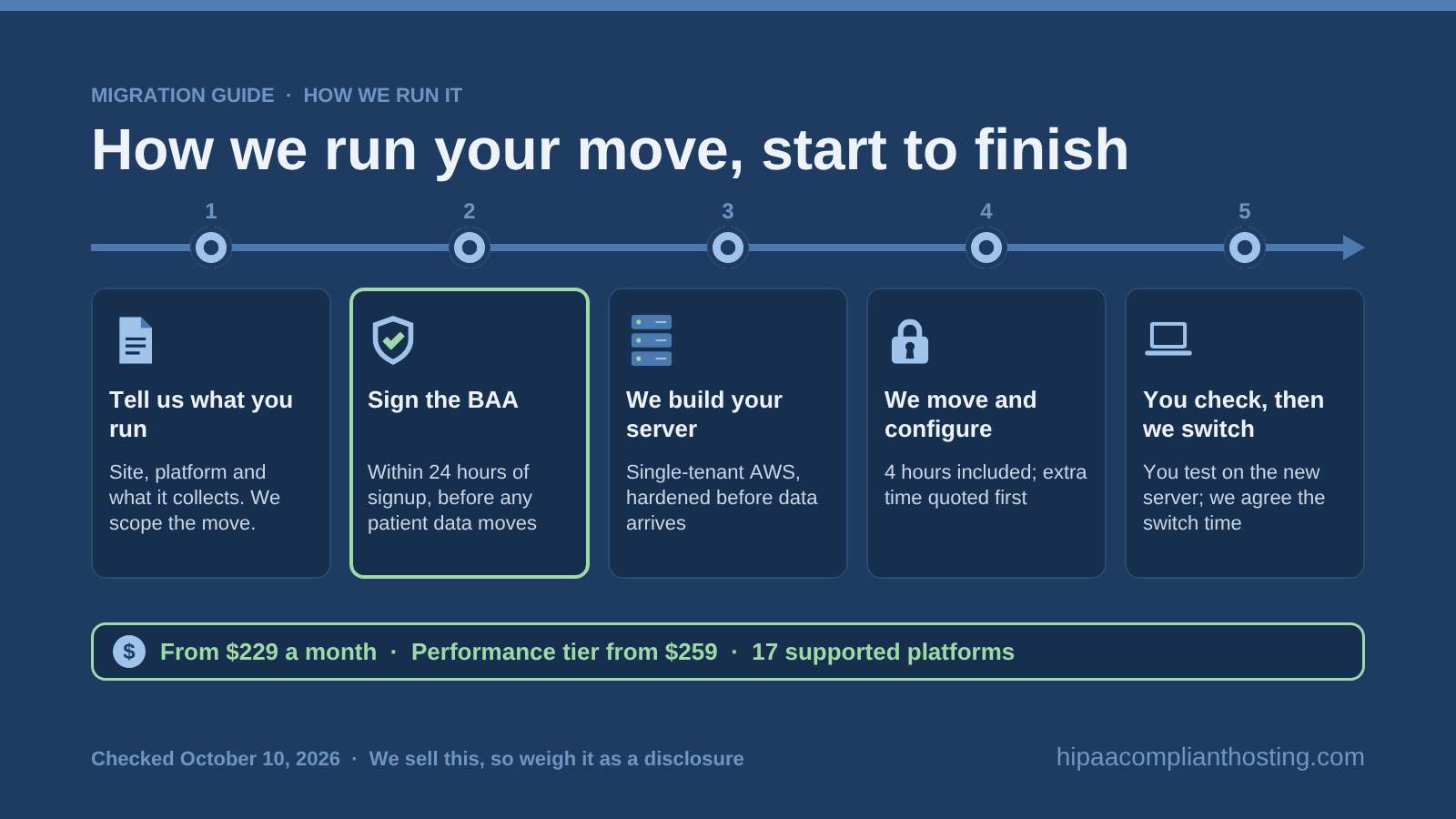
This is the part we sell, stated plainly. When you migrate to HIPAA compliant hosting with us, the steps above become five things you see.
Tell us what you run. Send your site address, platform and what it collects. We reply with a plan size and a scope for the move.
Sign the BAA. We sign within 24 hours of signup. Coverage starts before any patient data moves.
We build your server. A single-tenant AWS server, hardened, with encryption, a firewall, logging and backups already on.
We move and configure your site. 4 hours of migration and configuration are included in your first month. If your site needs more, we quote the extra time before we start.
You check it, then we switch. You test the site on the new server, and we agree on the switch time together.
We support 17 platforms, including WordPress, Drupal, Joomla, Laravel, n8n and Docker. Plans start at $229 a month. The Performance tier for n8n, Drupal, Strapi, Docker and Phalcon starts at $259. Most practices start with HIPAA compliant WordPress hosting. Software teams usually start with HIPAA cloud hosting.
When are we the wrong choice? If your site collects no patient data, ordinary hosting is fine. If you need root access or a multi-zone design, that is an Enterprise quote, not a standard plan. Our BAA covers the servers and services we run. Your email, SMS and EHR vendors need their own.
Frequently asked questions
How long does it take to migrate to HIPAA compliant hosting?
For a single website, the calendar time is set mostly by the BAA, testing and DNS. With us, the BAA is signed within 24 hours of signup. Larger apps and multi-site groups take longer, and we scope them before we start.
Do I need to sign the BAA before the migration starts?
Yes. Section 164.308(b) requires the BAA before a host stores patient data for you, so sign it before you migrate to HIPAA compliant hosting. A BAA dated after the move leaves a gap you cannot fix later.
Will my site go down when I migrate to HIPAA compliant hosting?
It does not have to. Build and test the new server while the old site stays live, then switch DNS. Lowering the DNS TTL a day or two ahead keeps the switch fast. Freeze form changes during the final sync.
Can I migrate a WordPress site to HIPAA compliant hosting?
Yes. The hosting is only one layer, though. Plugins, forms and email delivery need their own review. Our guide to whether WordPress is HIPAA compliant covers each layer.
What should I do with the data at my old host?
Delete it, including backups and snapshots, and get written confirmation. HIPAA requires a disposal procedure under § 164.310(d)(2)(i). If the old host signed a BAA, it must return or destroy the data at termination.
Is migration included in HIPAA hosting plans?
It depends on the host and the plan. If you migrate to HIPAA compliant hosting with us, every plan includes 4 hours of migration and configuration. Atlantic.Net's footnote names certain plans for its free hours, and HIPAA Vault includes free migration only with WordPress Starter.
What does it cost to migrate to HIPAA compliant hosting?
With us, the first 4 hours of migration and configuration are included in a plan from $229 a month. Extra time is $175 an hour, quoted first. Doing it yourself costs engineer time plus any freelancer, who would also need a BAA. To compare first-year totals with migration counted, see the year-one math for affordable HIPAA hosting.
Recap: migrate to HIPAA compliant hosting without a gap
To migrate to HIPAA compliant hosting safely, follow the order: inventory, BAA, hardened server, encrypted move, fixes, testing, cleanup and paperwork. The BAA comes before the data, and the old host is closed out in writing. Every step maps to a Security Rule requirement. That means each time you migrate to HIPAA compliant hosting this way, you also build your audit trail. If you want the move done for you, we sign the BAA within 24 hours and include 4 hours of migration and configuration in every plan. Request a quote for your practice, or talk through your app's stack with an engineer. You can also compare our current plans.
This article is general information, not legal advice. It describes our own commercial service, and we are one of the hosts compared. Vendor terms and prices are as published on October 10, 2026, and may change. Confirm your obligations with qualified counsel.
Sources
45 CFR § 164.308 (risk analysis, contingency plan, evaluation, BAAs): law.cornell.edu
45 CFR § 164.310 (disposal and media re-use): law.cornell.edu
45 CFR § 164.312 (technical safeguards, transmission security): law.cornell.edu
45 CFR § 164.402 (breach definition and risk assessment): law.cornell.edu
45 CFR § 164.504(e) (BAA contents, return or destruction at termination): law.cornell.edu
Atlantic.Net, HIPAA compliant hosting plans and migration footnote: atlantic.net
HIPAA Vault, managed WordPress hosting scope and prices: hipaavault.com
Liquid Web, HIPAA compliant hosting: liquidweb.com