


HIPAA Compliant Forms: How to Collect Patient Data Safely in 2026
HIPAA Compliant Hosting · https://hipaacomplianthosting.com/blog/hipaa-compliant-forms
Last updated: June 18, 2026
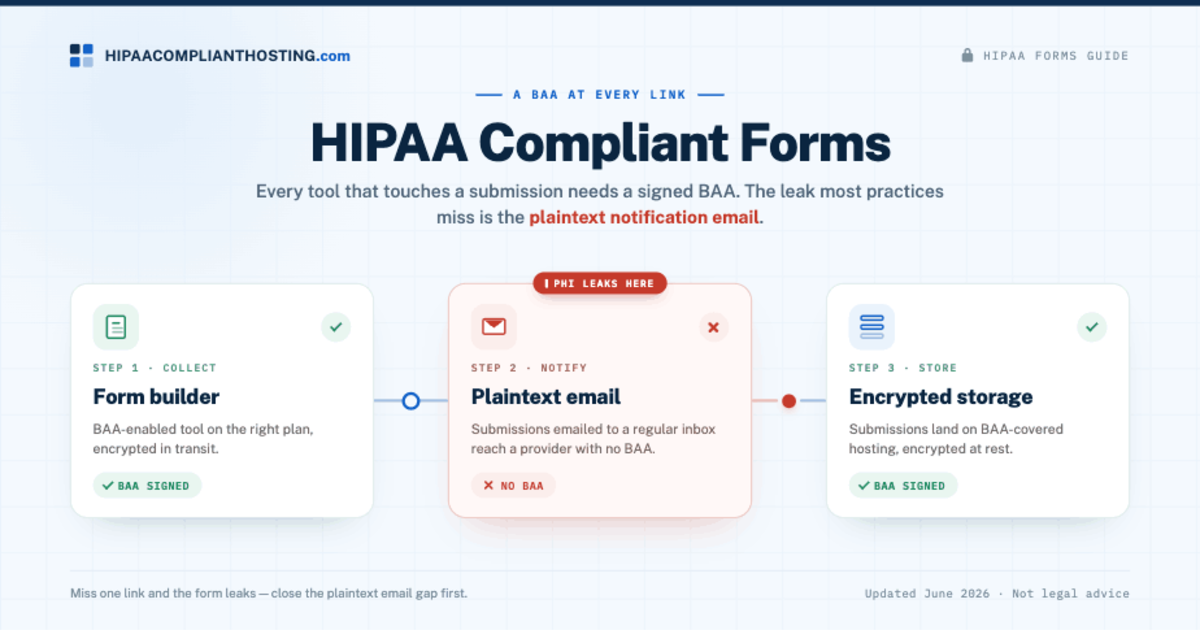
HIPAA compliant forms are web forms that collect patient data under a signed Business Associate Agreement (BAA), with encryption in transit and at rest, and a safe place for the submissions to land. A plain contact form is not a HIPAA problem until it asks about symptoms, an appointment, or anything tied to a person's health. At that point the form collects protected health information (PHI). Under 45 CFR § 164.308(b), every tool that receives that PHI, the form builder, the email that sends it, and the database that stores it, must be covered by a BAA. Miss one link and the form leaks. This guide explains what makes a form compliant, which tools sign a BAA, and the mistake that catches most practices.
TL;DR: Quick answer
- HIPAA compliant forms require a signed BAA with the form tool, because a tool that receives PHI is a Business Associate under 45 CFR § 160.103.
- The data must be encrypted in transit (TLS) and at rest, and only the right people should see submissions.
- The biggest leak is the notification email. A form that emails submissions in plaintext to a regular inbox sends PHI to an email provider with no BAA.
- Some builders sign a BAA on the right plan (Jotform on Gold or Enterprise, Formstack). Google Forms qualifies only inside a paid Workspace plan with the BAA accepted; default WordPress form plugins do not, so keep PHI off them.
- Wherever the submissions are stored also needs a BAA, which is why the form and the hosting have to be considered together.
What makes a form HIPAA compliant?
HIPAA does not regulate forms as objects. It regulates the data inside them. When a form collects health information tied to a person, that submission is PHI. The company whose tool receives or stores it becomes a Business Associate and must sign a BAA first. So HIPAA compliant forms come down to one chain: every tool that touches the submission is covered by a BAA, and the data is protected the whole way. The form builder, the email that delivers it, the database that holds it, and any app it flows into all sit in that chain. Headless CMS form plugins store submissions too, as our guide to whether Payload CMS HIPAA compliant apps are possible shows for Payload's Form Builder. Drupal's Webform module stores every submission in the database too, as our guide to whether Drupal HIPAA compliant sites are possible shows.
This is the same two-part rule that governs hosting: the contract plus the controls. For how that works across your whole site, see our complete guide to HIPAA-compliant hosting. Forms for pediatric or teen patients raise a separate question, covered in minors sign HIPAA forms.
When is a form holding PHI?
A form holds PHI when it ties an identity to health information. A name plus "please call me" is low risk. A name plus a symptom, a condition, an appointment reason, or an uploaded record is PHI. Common examples on a healthcare site are new patient intake forms, appointment requests that ask why you are booking, symptom or eligibility quizzes, and document uploads. If you are not sure whether your site crosses that line, our breakdown of who needs HIPAA-compliant hosting walks through it. The therapist case is worked through in are therapist contact form submissions regulated by HIPAA.
The requirements for HIPAA compliant forms
- A BAA with the form tool. The tool receives PHI, so it is a Business Associate and must sign a BAA under 45 CFR § 164.308(b). No BAA, no patient data.
- Encryption. TLS 1.2 or higher while the form is submitted, and encryption at rest where the data is stored.
- A safe destination. The submission must land somewhere covered by a BAA, not a plain inbox or a spreadsheet.
- Access control. Only authorized staff should see submissions, with unique logins and access removed when people leave.
- BAAs all the way down. Every downstream tool that gets the PHI, a CRM, an email service, a Zapier automation, or an AI assistant, needs its own BAA too.
The plaintext email trap
This is the mistake we see most. A form is set to email each submission to the front desk. That email travels through an email provider, and unless that provider has signed a BAA and the message is encrypted, it is an unprotected PHI disclosure on every single submission. The form builder can be perfect and the email still leaks the data. Joomla's core contact form shows the trap at its simplest: it stores nothing, but it emails every message, and its default mailer is PHP mail(), with no TLS setting. A Joomla HIPAA compliant site needs a host and mail relay under a BAA, with the Mailer switched to SMTP over TLS, before that form takes any health details.
Two fixes work. Send a content-free alert ("a new form was submitted") and keep the actual PHI in encrypted storage that staff log into. Or route notifications through an email service that signs a BAA and encrypts the message. Our guide to HIPAA-compliant email encryption covers that path. The mailbox side of that chain, the inbox those notifications land in and the provider behind it, is covered in our guide to HIPAA compliant email.
Which form tools sign a BAA?
Building HIPAA compliant forms starts here: the tool has to sign a BAA, and often only on a specific plan. Confirm the current terms before you trust any of them, because plans and policies change.
- Jotform. Signs a BAA and enables HIPAA features on its Gold and Enterprise plans, including encryption and access controls. The free and lower tiers are not HIPAA-enabled.
- Formstack. Offers HIPAA-capable plans with a BAA, aimed at larger practices and workflows.
- Google Forms. Covered only through Google Workspace. On a paid Workspace plan with the BAA accepted in the Admin console, Forms sits on Google's HIPAA Included Functionality list and can collect health information. The whole chain must stay inside covered services: the responses, any linked Sheet, and the notification emails, with sharing locked down. A form on a free consumer Google account can never collect PHI. The spreadsheet side of that stack is worked through in is Google Sheets HIPAA compliant. If submissions or uploads land in Drive, the file storage verdict is in is Google Drive HIPAA compliant.
- Default WordPress form plugins. Contact Form 7 and the free version of WPForms do not sign a BAA or encrypt submissions, so they should not collect health information. For the form architecture that does work on a WordPress site, see our deep dive on HIPAA compliant WordPress forms. The full WordPress picture is in how to make WordPress HIPAA compliant. The wider plugin question beyond forms is mapped in HIPAA compliant WordPress plugins.
One 2026 note: AI tools are now part of this chain. An AI intake assistant, chatbot, or transcription tool that handles form data is a Business Associate too, and it needs a BAA before it touches PHI.
Where the submissions are stored matters as much as the form
A HIPAA-enabled form builder protects the collection step. The data still has to live somewhere. If submissions are saved to your website's database, that database, and the hosting under it, must be covered by a BAA and encrypted. This is why HIPAA compliant forms and HIPAA-compliant hosting are the same project. The cleanest setup is a form tool that signs a BAA feeding into a host that signs a BAA, with no plain email or spreadsheet in between. For the storage side, our HIPAA compliant database hosting guide covers the data tier. When the form is a checkout, the store side is covered in is WooCommerce HIPAA compliant. Practices on Google Workspace often assume the suite's BAA reaches their website forms; it does not, as what the Google Workspace BAA does not cover explains.
How to check your own forms
To confirm your HIPAA compliant forms really are compliant, open each form on your site and ask four questions. Does it collect any health detail tied to a name? Does the form tool sign a BAA, and are you on the plan that includes it? Where does the submission go, and is every stop covered by a BAA? Is anything emailed in plaintext? Forms are one of several client-side places a healthcare site can leak data, alongside tracking scripts and third-party tools, which we cover in HIPAA tracking technologies. A form check like this is one part of a fuller HIPAA website audit of the whole site. Forms are two items on a longer list; the full HIPAA compliance checklist covers the rest of the site.
Get your forms and scripts reviewed
If your site takes intake details or bookings, a one-time audit is cheap next to a breach. Our client-side compliance review checks every form, tracking script, cookie, and third-party tool on your key pages, then returns a findings report with risk levels and clear fixes. For the storage and email side, HIPAA compliant hosting built for healthcare gives the submissions a BAA-covered home, so your HIPAA compliant forms have a safe place to land. We sell both services, so weigh that as a disclosure, not a neutral verdict. We also tell you plainly when a free fix, like turning off a plaintext notification, solves the problem on its own.
Frequently asked questions
What makes a form HIPAA compliant?
A signed BAA with the form tool, encryption in transit and at rest, a BAA-covered place for the submissions to land, access control on who can read them, and a BAA with every downstream tool the data flows into.
Is Google Forms HIPAA compliant?
Only inside a paid Google Workspace plan with the BAA accepted, since Forms sits on Google's Included Functionality list through Drive. A form on a free consumer Google account can never collect PHI. The responses, any linked Sheet, and notification emails must all stay inside covered services with sharing restricted.
Can I make a WordPress contact form HIPAA compliant?
Not with default plugins. Contact Form 7 and the free WPForms do not sign a BAA or encrypt submissions. Use a HIPAA-enabled form tool, stop plaintext email notifications, and store entries on BAA-covered hosting.
Is a plain contact form a HIPAA risk?
Only if it collects health information tied to a person. A name and a "call me" message is low risk. A symptom, condition, appointment reason, or record upload makes the submission PHI.
Does the form notification email need to be protected?
Yes. Emailing a submission in plaintext to a regular inbox sends PHI to an email provider with no BAA. Send a content-free alert, or use an email service that signs a BAA and encrypts the message.
Recap: HIPAA compliant forms
To recap, HIPAA compliant forms collect patient data only when every tool in the chain is covered by a BAA and the data stays encrypted. The form builder needs a BAA on the right plan, the notification email cannot leak PHI in plaintext, and the stored submissions need BAA-covered hosting. Check each form, confirm the BAA at every stop, and close the plaintext email gap first, because that is the leak most sites miss.
This article is general information, not legal advice. Vendor plans and BAA terms change; confirm current terms with each tool, consult qualified counsel, and base your safeguards on a documented risk analysis. Reviewed July 2026.
Sources
- 45 CFR § 164.308 (administrative safeguards, BAA requirement): ecfr.gov
- 45 CFR § 160.103 (definitions, Business Associate and PHI): ecfr.gov
- HHS: Business Associates guidance
- Google Workspace: HIPAA Included Functionality
- Jotform: HIPAA-enabled forms and BAA