


HIPAA Compliant Video Conferencing: Who Signs a BAA in 2026
HIPAA Compliant Hosting · https://hipaacomplianthosting.com/blog/hipaa-compliant-video-conferencing
Last updated: October 20, 2026
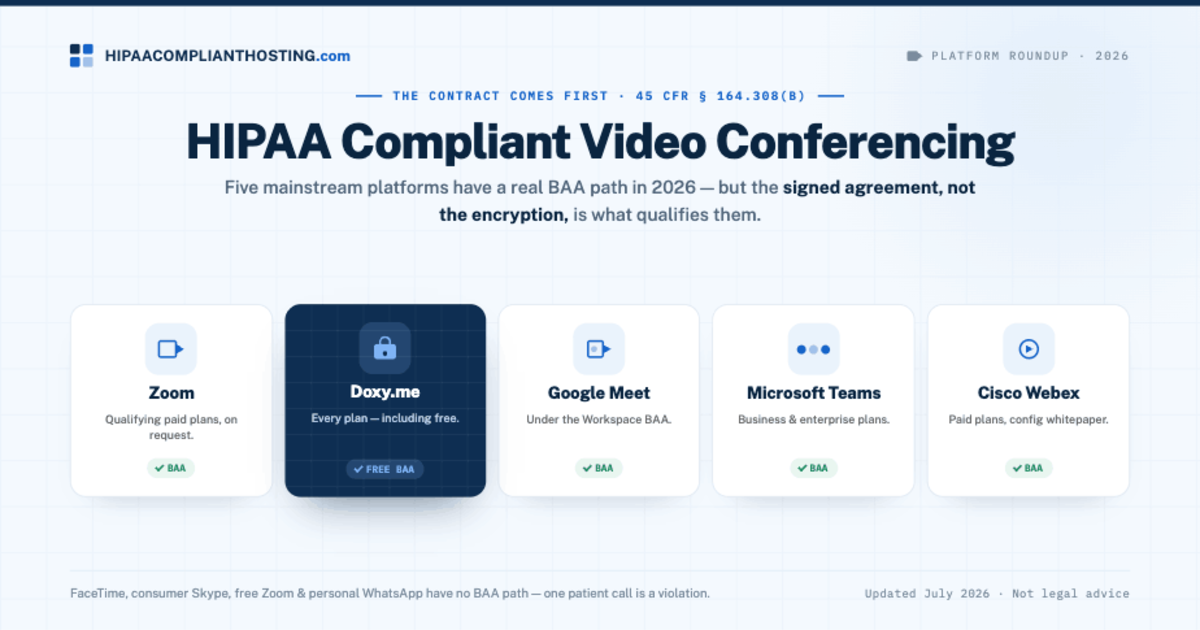
HIPAA compliant video conferencing is any video platform that signs a Business Associate Agreement (BAA) for your account and has the Security Rule safeguards turned on. The contract comes first in HIPAA compliant video conferencing. A platform that carries patient conversations is a Business Associate under 45 CFR § 160.103. HIPAA requires the written agreement before the first visit (45 CFR § 164.308(b), § 164.502(e) and § 164.504(e)). Encryption alone never qualifies a tool. In 2026, five mainstream platforms have a real BAA path: Zoom, Doxy.me, Google Meet, Microsoft Teams, and Cisco Webex. Several popular apps have none. One patient call on those is a violation. This guide gives the plan-by-plan answer, the platforms to avoid, and the setup work after the contract. We checked each vendor's own pages on October 20, 2026.
TL;DR: Quick answer
HIPAA compliant video conferencing requires two things: a signed BAA and correct configuration. The contract decides first. Settings and training do the rest.
Five mainstream platforms offer a BAA in 2026. They are Zoom (paid plans), Doxy.me (every plan, including free), Google Meet (Workspace BAA), Microsoft Teams (commercial plans) and Cisco Webex (by request).
FaceTime, free Zoom and WhatsApp have no BAA path, so they are never compliant for patient calls. Consumer Skype retired on May 5, 2025.
Doxy.me is the outlier worth knowing: its Free plan includes an individual BAA for one provider. No other platform in this guide says its free tier includes a BAA.
Vendor policies change. We checked every vendor claim here on the vendor's own pages on October 20, 2026. Confirm current terms before you sign.
The video call is half the picture. Booking, intake forms, reminders, and your website carry PHI before the call starts. They need their own BAA-covered home. We sell BAA-covered hosting for booking, intake and your website, with managed plans from $229 a month.
When is a video call PHI?
Almost always, in a care context. A telehealth session ties a named patient to their health in real time. The session, the chat, any recording, and the appointment details are all protected health information under 45 CFR § 160.103. That makes the platform a Business Associate, because it creates, receives, maintains or transmits PHI for you. The HIPAA business associate agreement is the legal gate, and it is where every HIPAA compliant video conferencing decision starts. The full stack view, including recordings and state rules, is in our guide to telehealth HIPAA compliance.
Which platforms sign a BAA in 2026?
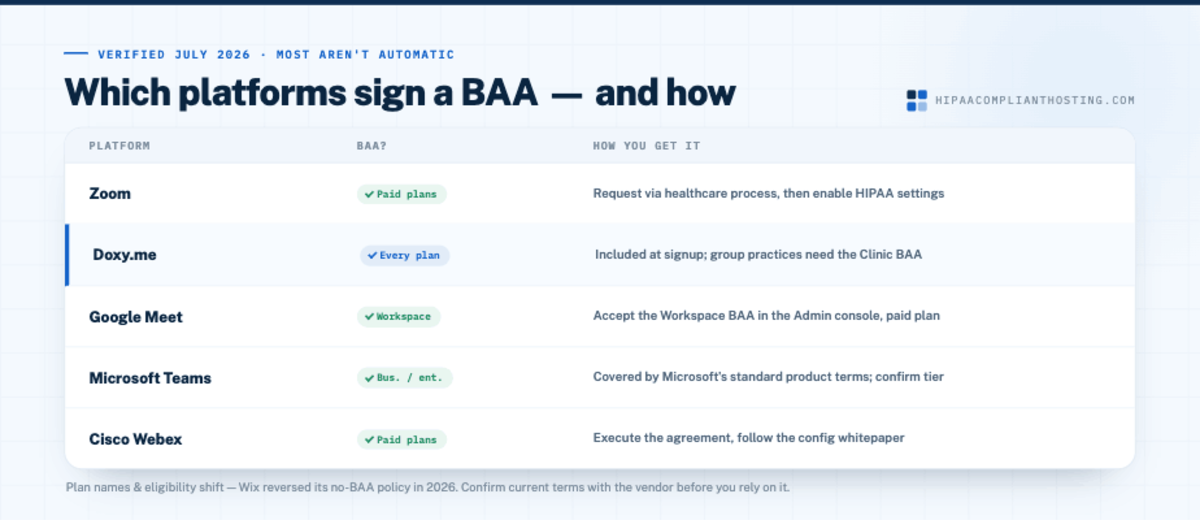
Here is the HIPAA compliant video conferencing list, checked on each vendor's own pages on October 20, 2026. How you get the BAA matters as much as the yes, because most of these are not automatic.
Platform | BAA available? | How you get it |
|---|---|---|
Zoom | Yes, on paid plans | On Pro, choose the US BAA at checkout or enable it in Plan Management. For Business, Business Plus and Enterprise, contact Zoom Sales. Zoom's BAA page lists paid plans only. Full plan rules: is Zoom HIPAA compliant |
Doxy.me | Yes, on every plan including free | Free plans include an individual BAA that covers one provider and their personal room. Paid plans add a clinic-level BAA that covers every user in the clinic |
Google Meet | Yes, through Google Workspace | An admin reviews and accepts the Workspace BAA in the Admin console; Meet is on Google's covered list. Setup detail: Google Workspace HIPAA |
Microsoft Teams | Yes, on commercial (business and enterprise) plans | Microsoft's BAA comes by default through its Online Services Data Protection Addendum, and Teams is on its in-scope list; confirm your license is a commercial plan. The wider suite setup is in Microsoft 365 HIPAA |
Cisco Webex | Yes, by request | Cisco's Webex trust page links a "Need a BAA?" signing form and a HIPAA compliance whitepaper. Sign before patient use and confirm your Webex plan is in scope |
One caution for the whole table: plan names and eligibility shift. Website builders shift too: Wix announced a HIPAA option with a signable Business Associate Agreement on April 7, 2026. Video vendors adjust terms the same way. Treat this table as checked October 20, 2026, and confirm current terms with the vendor before you rely on it.
Weighing full practice systems too? The wider HIPAA compliant telehealth platform comparison covers Doxy.me and SimplePractice as well.
The platforms that never work
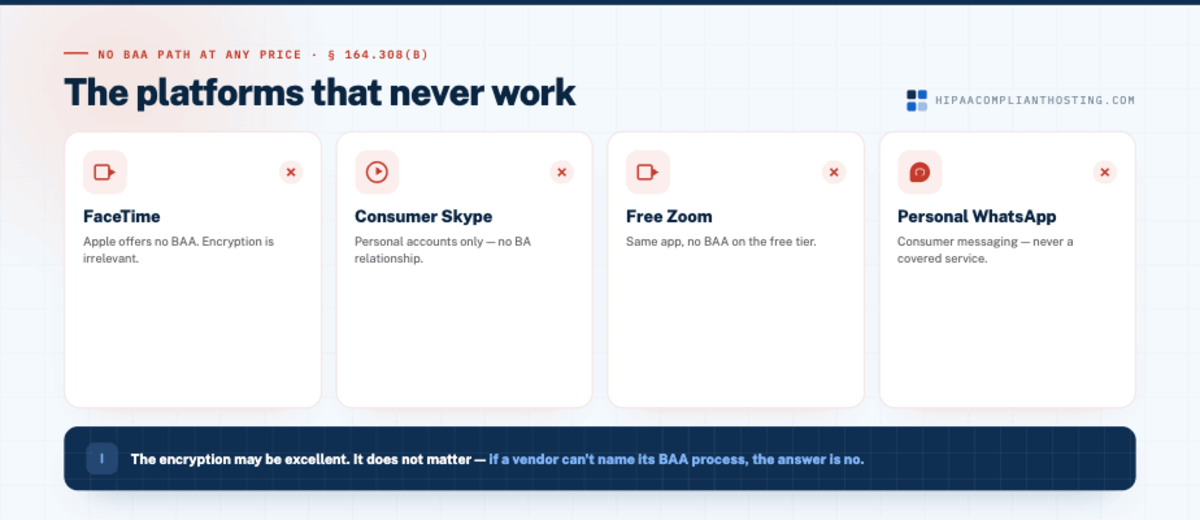
FaceTime, free Zoom and WhatsApp offer no BAA path at any price. Apple's iOS 27 license says HIPAA covered entities and business associates will not use Apple services in a way that makes Apple their business associate. Meta's terms say Meta is not a business associate and the WhatsApp Business Platform is not HIPAA compliant. Zoom's BAA page lists paid plans only. Consumer Skype retired on May 5, 2025, and Microsoft points Skype users to Teams Free. Microsoft's BAA covers Teams in its commercial Microsoft 365 services, and Teams Free is a consumer service.
These apps may have excellent encryption. It does not matter. With no Business Associate Agreement, a single patient call on any of them breaks 45 CFR § 164.308(b), § 164.502(e) and § 164.504(e). The same goes for any tool that only offers personal accounts. The pandemic exception is gone too. OCR's COVID-19 telehealth enforcement discretion expired on May 11, 2023, and its 90-day transition period ended on August 9, 2023. No setting turns a consumer app into HIPAA compliant video conferencing. If a vendor cannot name its BAA process, the answer is no.
The BAA is not the finish line
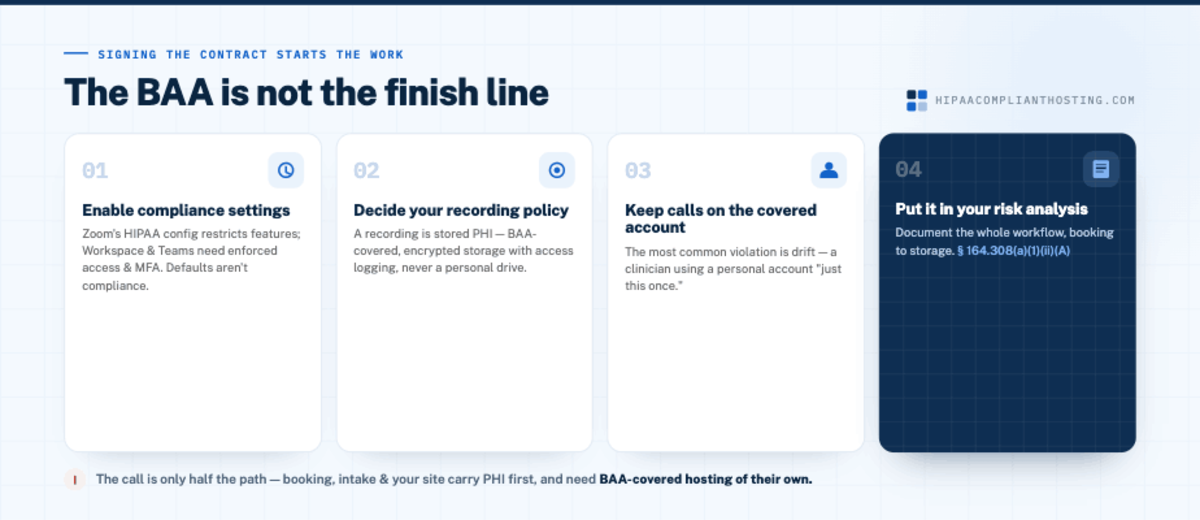
Signing the contract starts the work. HIPAA compliant video conferencing still fails when the settings and habits are wrong. Four things close the gap:
Check the compliance settings. Zoom says no extra manual setup is needed once its BAA is signed, though some AI features may be unavailable. Workspace and Teams depend on admin settings, such as access controls and MFA. Defaults are not compliance.
Decide your recording policy. A recorded session is stored PHI. It needs BAA-covered, encrypted storage with access logging, never a personal drive. The consent, storage, and retention rules are in our guide to HIPAA compliant video recording.
Keep every patient call on the covered account. Watch for drift: a clinician using a personal account "just this once." That call has no BAA behind it.
Put it in your risk analysis. 45 CFR § 164.308(a)(1)(ii)(A) requires an accurate and thorough assessment of risks to ePHI. Include the whole video workflow, from booking to storage.
How do you choose between them?
Match the platform to what your practice already runs. The cheapest compliant option is usually the BAA you can activate today. A solo therapist gets the fastest start with Doxy.me, because the free plan carries an individual BAA. A practice on Google Workspace can cover Meet once an admin accepts the BAA in the Admin console. A Microsoft 365 shop should look at Teams first for the same reason. Groups that want a dedicated telehealth tool can compare Zoom's healthcare plans with Doxy.me's Premium plan. Organizations already on Cisco can request the Webex BAA. There is no single best HIPAA compliant video conferencing platform. There is the platform whose BAA, settings, and price fit your stack.
Secure healthcare video hosting: where recordings and self-hosted video live
Recordings are the part of HIPAA compliant video conferencing that outlives the call. A recorded visit is electronic protected health information under 45 CFR § 160.103. It needs storage covered by a BAA, with encryption and access logging. Where the file lands depends on the platform. Google Meet saves recordings to the organizer's Google Drive, which is on Google's covered list. Teams saves them to the organizer's OneDrive or a channel's SharePoint site, both on Microsoft's in-scope list. The risk starts when someone downloads a copy to a laptop or a personal cloud folder.
Some practices skip the video vendor and self-host an open source app. Jitsi Meet, for example, publishes a self-hosting guide that includes a Docker setup. Self-hosting moves the BAA question to whoever runs the server. If a hosting company runs it, that company is your business associate and must sign a BAA. Someone still has to handle encryption, patching, logs and backups.
Disclosure: we do not sell a video platform. We host the server side, such as a Docker-based video app or the server your recordings are stored on. Our BAA covers the servers and services we run, not Zoom, Google, Microsoft or any other video vendor. HIPAA compliant Docker hosting is on our Performance tier, from $259 a month, on single-tenant AWS. Every plan includes encryption at rest and in transit, six-year audit logging and tested encrypted backups. For the wider map of which practice systems need a HIPAA host, see healthcare IT hosting.
The other half: everything around the call
The platform covers the call. It does not cover how the patient got there. The appointment was booked somewhere, and schedulers have their own BAA rules; see is Calendly HIPAA compliant. The intake form collected health details somewhere; the standards are in HIPAA compliant forms. The confirmation email, the join page, and any stored records live on your website. That infrastructure needs its own HIPAA compliant hosting under a BAA. A perfect video setup feeding an uncovered intake form is still a violation. The leak just happens before the call.
If you want the rest of the path hosted under a BAA
Tell us how your telehealth visits run: how patients book, what the intake asks, where the site lives, and which video platform you use. We do not sell video. We sell the other half: BAA-covered hosting for the booking, intake, and site, plus a client-side compliance review. Managed plans start at $229 a month, billed monthly with no long-term contract. We sign our BAA within 24 hours of signup, before patient data moves. Our BAA covers the servers and services we run, so your video vendor still needs its own. Weigh all of this as a disclosure: we sell hosting.
Frequently asked questions
Which video conferencing platforms are HIPAA compliant?
Five mainstream platforms offer a BAA in 2026. They are Zoom (paid plans), Doxy.me (all plans), Google Meet (Workspace BAA), Microsoft Teams (commercial plans) and Cisco Webex (by request). Each becomes HIPAA compliant video conferencing only after the BAA is signed and the settings are configured.
Is Google Meet HIPAA compliant?
Yes, once your Workspace admin accepts Google's BAA in the Admin console. Meet is on Google's list of covered services, but third-party add-ons are not. Sharing and recording settings are still yours to manage. See what the Google Workspace BAA still does not cover.
Is Microsoft Teams HIPAA compliant?
Yes, on commercial Microsoft 365 plans. Microsoft offers its BAA by default through its Online Services Data Protection Addendum, and Teams is on its in-scope list. Teams Free is a consumer service outside those commercial plans, so use a business plan for patients. Setup steps are in Microsoft 365 HIPAA compliance.
Is FaceTime HIPAA compliant for telehealth?
No. Apple's iOS 27 license says HIPAA covered entities and business associates will not use Apple services in a way that makes Apple their business associate. That rules out FaceTime for patient calls, whatever its encryption. The same applies to free Zoom and WhatsApp.
Is there free HIPAA compliant video conferencing?
Yes. Doxy.me's Free plan includes an individual BAA that covers one provider and their personal room. That makes it a free HIPAA compliant video conferencing choice to start with. No other platform in this guide says its free tier includes a BAA, and Zoom's BAA page lists paid plans only.
Is a BAA enough to make video visits compliant?
No. The BAA is the legal gate. You still need the platform's settings checked and a deliberate recording policy. Staff must keep every patient call on the covered account. Document the whole workflow in your risk analysis.
Does the video platform cover my booking and intake forms?
No. The platform's BAA covers the call. Scheduling tools, intake forms, reminder emails, and your website each need their own BAA-covered handling, because PHI flows through them before the visit starts. Text reminders follow their own rules; see HIPAA compliant texting.
Recap: HIPAA compliant video conferencing
To recap, HIPAA compliant video conferencing is a signed BAA plus correct configuration, in that order. Five mainstream platforms offer a BAA path in 2026: Zoom, Doxy.me, Google Meet, Microsoft Teams, and Webex. FaceTime and consumer apps never do. Pick the platform whose BAA fits the stack you already run. Check its compliance settings and keep recordings in covered storage. And remember the call is only half the path: booking, intake, and your site need BAA-covered hosting of their own.
This article is general information, not legal advice. Platform plans, BAA eligibility and covered-service lists are as each vendor described them on October 20, 2026, and they change. Confirm current terms with each vendor, consult qualified counsel, and base your safeguards on a documented risk analysis. We sell HIPAA compliant hosting and compliance reviews. Reviewed October 2026.
Sources
Zoom Support: HIPAA Business Associate Agreement (BAA)
Doxy.me Help Center: How do I know if I need a BAA?
Doxy.me: Pricing and Free plan
Google Workspace: HIPAA compliance with Google Workspace and Cloud Identity
Google Cloud: HIPAA compliance on Google Cloud and Google Workspace
Google Meet Help: Record a video meeting
Microsoft: HIPAA and the HITECH Act compliance offering
Microsoft Learn: Teams meeting recording
Microsoft Support: Skype is retiring in May 2025
Microsoft: Free Microsoft Teams
Cisco: Cisco Webex Trusted Platform
Apple: iOS 27 and iPadOS 27 software license agreement, section 10(b)
Meta: Meta Terms for WhatsApp Business Platform, section 4.2
Jitsi Meet Handbook: Self-Hosting Guide
HHS: HIPAA and Telehealth
45 CFR § 160.103 (business associate and PHI definitions): law.cornell.edu
45 CFR § 164.308 (BAA requirement, risk analysis): law.cornell.edu
45 CFR § 164.502 (disclosures to business associates): law.cornell.edu
45 CFR § 164.504 (business associate contracts): law.cornell.edu