


HIPAA Backup and Disaster Recovery: What Healthcare Websites Need in 2026
HIPAA Compliant Hosting · https://hipaacomplianthosting.com/blog/hipaa-backup-and-disaster-recovery
Last updated: October 20, 2026
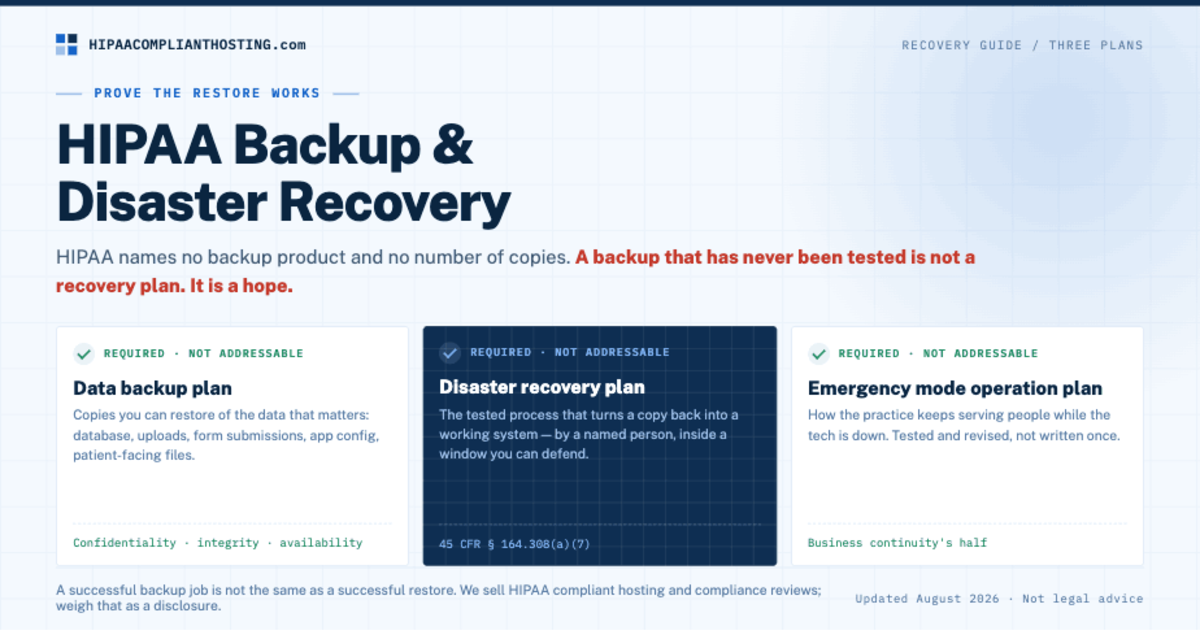
A HIPAA-ready backup plan does more than store copies of your files. It has to prove one thing: the restore works. Safely. By the right person. Within a window the practice can live with. And without creating a new exposure. That is the whole job of HIPAA backup and disaster recovery. Picture the Monday morning version. Your healthcare website goes down. The intake form is gone. The patient portal throws errors. Someone says, "We have backups." Nobody can answer the next question. Where are they? Who can restore them? How long will it take? Does the backup hold patient data under the right agreement? That gap is what HIPAA backup and disaster recovery actually covers.
HIPAA does not name a backup product or a number of copies. It has a contingency plan standard (45 CFR § 164.308(a)(7)). That standard names the jobs: a data backup plan, a disaster recovery plan, and an emergency mode operation plan. All three are required specifications, not addressable ones. The goal is to protect the confidentiality, integrity, and availability of electronic protected health information (ePHI). A backup that has never been tested is not a recovery plan. It is a hope. This guide explains what a working HIPAA backup and disaster recovery plan looks like for a healthcare website. It shows where plans usually break down. And it covers when managed hosting is the cleaner answer.
TL;DR: Quick answer
HIPAA backup and disaster recovery means restorable copies of the data that matters: the database, uploads, form submissions, app config, and any patient-facing files.
The rule behind it is the contingency plan standard (45 CFR § 164.308(a)(7)). It requires a data backup plan, a disaster recovery plan, and an emergency mode operation plan, plus addressable testing and revision.
Protect backup access like production access: named users, MFA, limited permissions, and audit records.
Put every vendor that can create, store, or touch ePHI under a Business Associate Agreement (BAA) before PHI reaches its systems.
Prove recovery works by testing it. A successful backup job is not the same as a successful restore.
A plain marketing site with no PHI can run a lighter plan. Once forms, portals, scheduling, documents, or integrations can handle patient information, the backup path needs a real risk analysis and a written recovery process. The analysis itself, and its nine required elements, is covered in HIPAA risk analysis.
Why "we have backups" is not enough
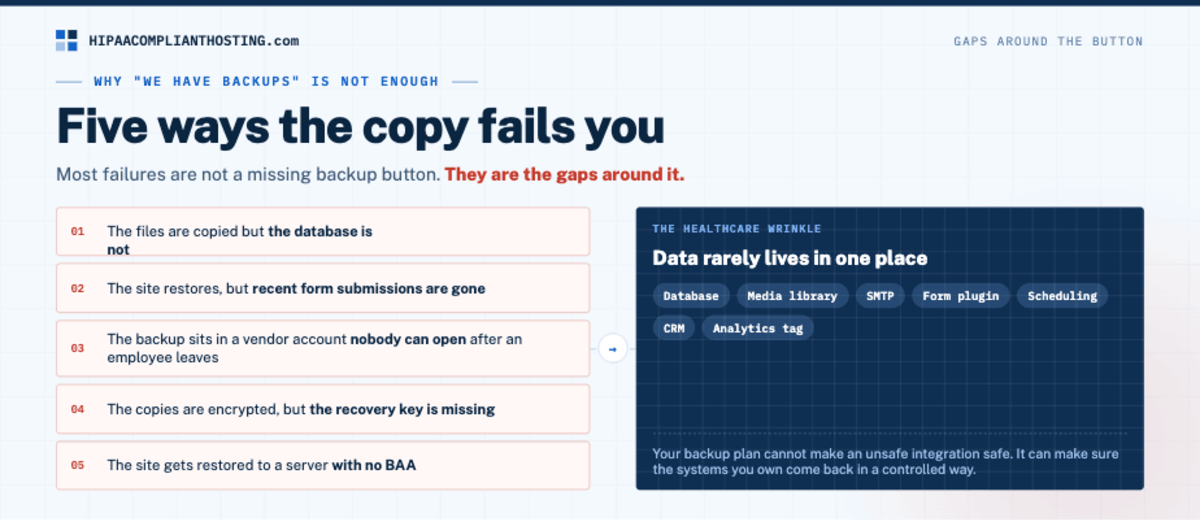
Most website backup failures are not a missing backup button. They are gaps around it.
The files are copied but the database is not. The site restores, but the recent form submissions are gone. The backup sits in a vendor account nobody can open after an employee leaves. The copies are encrypted, but the recovery key is missing. Or the site gets restored to a server with no BAA.
A healthcare website adds one more problem. Data rarely lives in one place. A WordPress database, media library, SMTP service, form plugin, scheduling tool, CRM, and analytics tag can all sit in one patient journey. Your backup plan cannot make an unsafe integration safe. It can make sure the systems you own can come back in a controlled way.
That is why HIPAA backup and disaster recovery belongs inside the wider compliance picture, not a standalone checklist. Backups are one of the items our own HIPAA website audit checks at the hosting layer, right beside the BAA and encryption. The rule is risk-based. What can go wrong? What data is hit? What safeguards are reasonable? And how does the practice keep running when something fails?
What needs to be in a healthcare website backup
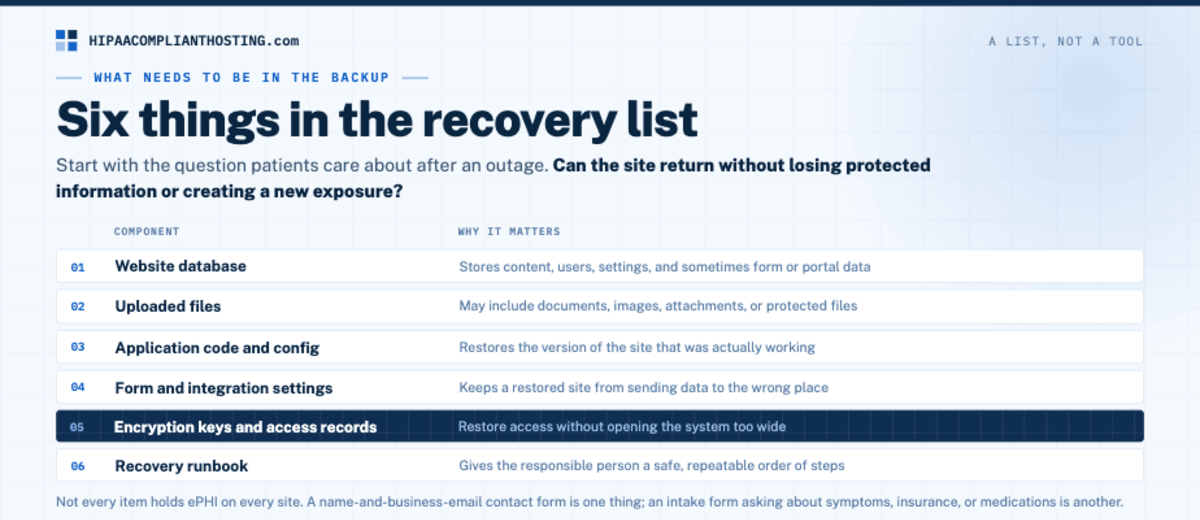
Good HIPAA backup and disaster recovery starts with a list, not a tool. Start with the question patients will care about after an outage. Can the site return without losing protected information or creating a new exposure?
For a typical healthcare website, the recovery list looks like this:
Component | Why it matters |
|---|---|
Website database | Stores content, users, settings, and sometimes form or portal data. |
Uploaded files | May include documents, images, attachments, or protected files. |
Application code and config | Restores the version of the site that was actually working. |
Form and integration settings | Keeps a restored site from sending data to the wrong place. |
Encryption keys and access records | Restore access without opening the system too wide. |
Recovery runbook | Gives the responsible person a safe, repeatable order of steps. |
Not every item holds ePHI on every site. That is exactly why the list matters. A contact form that asks only for a name and business email is one thing. An intake form asking about symptoms, insurance, or medications is another. Read our guide to HIPAA compliant WordPress forms before treating all forms the same.
The five questions your recovery plan has to answer
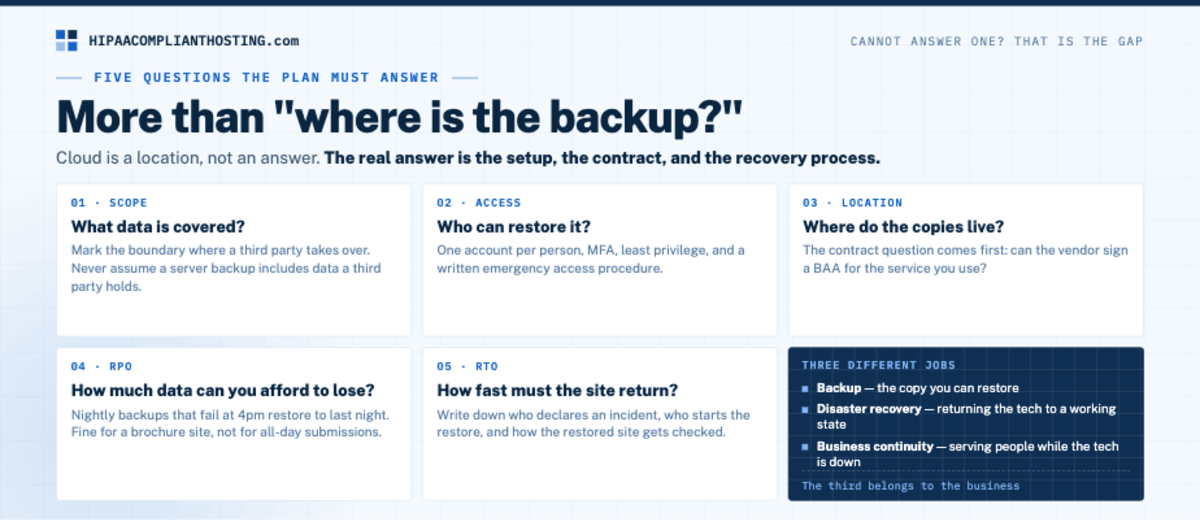
A usable HIPAA backup and disaster recovery plan answers more than "where is the backup?"
1. What data is covered?
List the systems and data flows first. Include the main site, database, files, and any service that receives patient information from the site. If the site hands data to a separate portal or scheduling platform, mark that boundary. Never assume a server backup includes data a third party holds. If you self-host an EHR like OpenEMR, back up its database and document store together, as our guide to HIPAA compliant EHR hosting explains.
2. Who can restore it?
Limit recovery access to named people with a real job to do. Shared admin logins create an ugly problem mid-incident. They hide who changed what. And they turn a recovery credential into a standing risk.
Use one account per person, MFA, least-privilege access, and a written emergency access procedure. The goal is not slow recovery. The goal is recovery without handing broad access to everyone. Log every restore and backup download, too. Our guide to HIPAA audit logs covers what to record.
3. Where do the copies live?
A backup vendor that stores or can touch ePHI is part of the compliance picture. The contract question comes first. Can the vendor sign a BAA for the service you use? The technical question follows. Are the copies encrypted, access-controlled, and kept apart from the failure that could take out the main site? Backup copies can outlive a contract, so check what a BAA says about returning or destroying data when the service ends.
Do not confuse "cloud backup" with an answer. Cloud is a location. The real answer is the setup, the contract, and the recovery process. Location does matter under some state laws. Texas SB 1188 requires covered entities to keep electronic health records physically in the United States or a US territory. Since January 1, 2026, it has reached records of any age, including cloud copies and backups. The Florida health data storage law sets a similar rule for providers that use certified EHR technology, and it allows Canada as well.
4. How much data can you afford to lose?
This is the recovery point objective (RPO). A site backed up nightly that fails at 4pm restores to last night. Fine for a brochure site. Not fine for a database that takes patient submissions all day.
The right RPO comes from the workload, not a generic schedule. How often does the data change? Do those changes include PHI? Does another system hold the master record?
5. How fast must the site return?
This is the recovery time objective (RTO). A site that supports intake, appointments, or a portal needs a better answer than "as soon as possible." Write down who declares an incident and who starts the restore. Decide how the restored site gets checked. And decide how staff and patients are redirected in the meantime.
Cannot answer all five today? That is the gap, and it is a fixable one. It is also exactly what any HIPAA web hosting provider you shortlist should answer in writing before you sign. To build that shortlist, start with our comparison of Atlantic.Net and four alternatives.
Backup, disaster recovery, and business continuity are different jobs
These terms get mixed together. They solve different problems.
Backup is the copy you can restore, of data or systems.
Disaster recovery is the process for returning the tech to a working state.
Business continuity is how the practice keeps serving people while the tech is down.
HIPAA backup and disaster recovery covers the first two jobs. The third belongs to the business. A backup can be healthy while the recovery plan fails. A restore may take two hours. The practice still needs a safe way to take appointment requests during those two hours.
A hosting partner can own the parts it agrees in writing to run, such as the servers, backups, and recovery tooling. It cannot decide which staff member calls patients, how the practice triages care, or which data the business cannot live without. Make that split clear before an outage, not during one.
The pain point: backups become your job at the worst possible time
Self-managed hosting is a fair choice for a team with real technical ownership. But the duty does not vanish because a backup plugin says "complete."
Someone still reviews failures. Someone protects the storage account. Someone tests restores, patches the server, tracks the vendors, and knows whether a plugin is putting patient data outside the planned boundary. With self-managed hosting, every one of those jobs lands on your own team. A host offering managed HIPAA hosting takes over only the jobs its contract names. Tracking your other vendors stays with you.
That is where many practices get stuck. They do not need more dashboard alerts. They need a hosting setup with a clear split of duties. The BAA, access controls, logs, backups, and tested recovery should sit in one written scope. That is HIPAA backup and disaster recovery as an owned service, not a plugin setting.
We sell managed hosting, so weigh that as a disclosure. Many practices do not want backups sitting on the office manager. For them, our managed HIPAA cloud hosting runs on single-tenant AWS from $229 a month, on monthly plans with no long-term contract. Our HIPAA compliant WordPress hosting starts at the same price. We sign the BAA within 24 hours of signup, before patient data moves. Our BAA covers the servers and services we run. Your email, form, and EHR vendors need their own.
How we handle HIPAA backup and disaster recovery: these three facts hold for every plan, so you can check them against your RTO and retention needs.
Tested encrypted backups.
EBS storage with 7-day snapshot retention.
One server in one AWS availability zone. A multi-zone design is quoted separately.
That last line matters for your RTO. AWS says failures are rare, but if all your instances sit in one location that fails, none of them are available. Running in more than one availability zone protects against that. If you cannot wait out a zone outage, ask for the multi-zone quote.
Plans come with 4 hours of migration and configuration included in the first month, then $175 an hour, quoted before work starts. Changing hosts? Our guide on how to migrate to HIPAA compliant hosting covers the steps. The managed path fits when you would rather have backups and snapshots built into your plan than run them on your own.
A simple recovery test for your next review
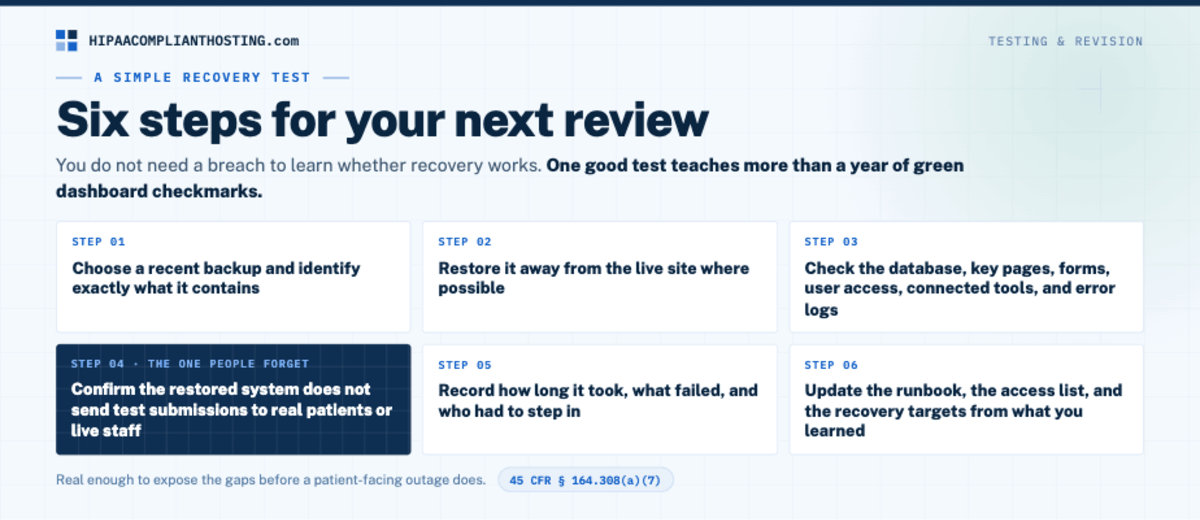
You do not need a breach to learn whether recovery works. Run a controlled test and record the result. This is also the testing-and-revision piece the contingency plan standard expects.
Choose a recent backup and identify exactly what it contains.
Restore it away from the live site where possible.
Check the database, key pages, forms, user access, connected tools, and error logs.
Confirm the restored system does not send test submissions to real patients or live staff.
Record how long it took, what failed, and who had to step in.
Update the runbook, the access list, and the recovery targets from what you learned.
The test does not need to be dramatic. It needs to be real enough to expose the gaps before a patient-facing outage does. One good test teaches more about HIPAA backup and disaster recovery than a year of green dashboard checkmarks.
Frequently asked questions
Does HIPAA require off-site backups?
HIPAA is risk-based and names no single storage design. The contingency plan standard requires a data backup plan and a disaster recovery plan that fit your ePHI. Your risk analysis should document why the chosen approach is reasonable. For most websites, copies kept apart from the main failure are the answer you can defend. That is the practical floor for HIPAA backup and disaster recovery.
Are WordPress backups HIPAA compliant?
A WordPress backup can be part of a compliant setup. The plugin does not decide. What data does the site hold? Can the backup service sign a BAA where needed? Who can open the copies? Are they encrypted? Are restores tested? Those answers decide.
Does a BAA make a backup service HIPAA compliant?
No. The BAA is required when a business associate holds your data, but it is not the whole program. The service still needs real safeguards. You still need to configure and run your side responsibly.
How often should a healthcare website be backed up?
There is no universal HIPAA interval. Set the schedule from the data loss you can tolerate, how often the site changes, and whether it receives patient information. The schedule should match an RPO you can defend in writing.
What is the difference between backup and disaster recovery under HIPAA?
The backup is the copy. Disaster recovery is the tested process that turns the copy back into a working system. The contingency plan standard (45 CFR § 164.308(a)(7)) asks for both, plus an emergency mode plan for operating during the outage.
Can a managed host handle our disaster-recovery plan?
Partly. A managed host can own the technical parts written into its contract, such as backups and the servers it runs. Our plans include tested encrypted backups and EBS storage with 7-day snapshot retention, on one server in one AWS availability zone. Your practice still owns the incident process, the access policies, and the continuity plan for patient care.
Recap: HIPAA backup and disaster recovery
To recap, HIPAA backup and disaster recovery means a restore you have proven. The right person runs it, inside a window you can live with, without creating a new exposure. Start with the data list. Set an RPO and RTO you can defend. Confirm the BAA chain and access controls. Test the restore and write down what you learned. Then decide honestly whether your team wants to carry the technical ownership.
Not sure where your setup stands today? Ask about our client-side compliance review. Talk to HIPAA Compliant Hosting about a managed plan with tested encrypted backups, six-year audit logging, and EBS storage with 7-day snapshot retention. All three come with every plan, including our HIPAA compliant ePHI hosting.
This article is general information, not legal advice. HIPAA is risk-based; a backup plan alone does not create or prevent compliance. Pricing reflects published 2026 rates and may change. Confirm your duties with qualified counsel and base your safeguards on a written risk analysis. We sell HIPAA compliant hosting and compliance reviews. Reviewed October 2026.
Sources
45 CFR § 164.308 (administrative safeguards, incl. the contingency plan standard at (a)(7)): ecfr.gov
45 CFR § 164.310 (physical safeguards): ecfr.gov
45 CFR § 164.312 (technical safeguards): ecfr.gov
Texas Legislature: SB 1188 enrolled text
Florida Statutes § 408.051: leg.state.fl.us